AI Prompts That Make
Every Photo a Masterpiece.
AI-Powered Creativity for Photo Booths
What are AI Prompts For Photo Booths?
Real Faces. Unreal AI Results.
For a photo booth owner, a Prompt is the secret “code” you put into your software (like Snappic or Foto Master) to give your guests a one-of-a-kind souvenir that looks like a piece of art rather than just a quick snapshot. Prompts are the “instructions” that tell the AI how to cook the final result. If your software can do AI Prompts, these will work for you! Supports all AI Photo Booth Software.
Can I Customize the AI Prompt?
Real Faces. Unreal AI Results.
Customizing the AI prompt is actually the “secret sauce” that makes your photo booth experience unique. Not all AI software reads prompts the same way. We have meticulously tested our prompts across Fotomaster, Snappic, Darkroom, Touchpix, and Booth Events.
Smart Prompt
Tailored for the Highest Quality Outputs
Photo Booth Ready
Compatible with Major Photo Booth Softwares

Instant Downloads
Ready to drop straight into your software.
Alternative Versions
To ensure compatibility with AI systems.
- Pre-written AI prompts: Each pack includes pre-written AI prompts plus alternative prompt versions, ensuring compatibility with all major AI photo booth software. AI Prompts for photos compatible with Fotomaster, Darkroom, Snappic, Touchpix, Curator Live, Booth Events, and other AI Photo booth software.
- Instant Background: We use Depth-Mapping syntax that tells the AI exactly where the guest ends and the background begins. This creates a "clean cut" even if the guest is standing in front of a messy ballroom or a busy hallway.
- Pre-written AI prompts: Each pack includes pre-written AI prompts plus alternative prompt versions, ensuring compatibility with all major AI photo booth software. AI Prompts for photos compatible with Fotomaster, Darkroom, Snappic, Touchpix, Curator Live, Booth Events, and other AI Photo booth software.
- Instant Background: We use Depth-Mapping syntax that tells the AI exactly where the guest ends and the background begins. This creates a "clean cut" even if the guest is standing in front of a messy ballroom or a busy hallway.
- The Sweet Spot: We provide the exact Numerical Strength Settings for every style. This prevents the "Plastic Look" and ensures the transformation is just deep enough to be magical, but light enough to be recognizable.
- Pre-Tested Workflow: You aren't buying a 'description' of a scene. You are buying a Pre-Tested Workflow that has been stress-tested against 500+ different face types, lighting conditions, and group sizes. We do the engineering so you can focus on the event. AI Face Swap.
- The Sweet Spot: We provide the exact Numerical Strength Settings for every style. This prevents the "Plastic Look" and ensures the transformation is just deep enough to be magical, but light enough to be recognizable.
- Pre-Tested Workflow: You aren't buying a 'description' of a scene. You are buying a Pre-Tested Workflow that has been stress-tested against 500+ different face types, lighting conditions, and group sizes. We do the engineering so you can focus on the event. AI Face Swap.
Why Our AI Prompts Are Different
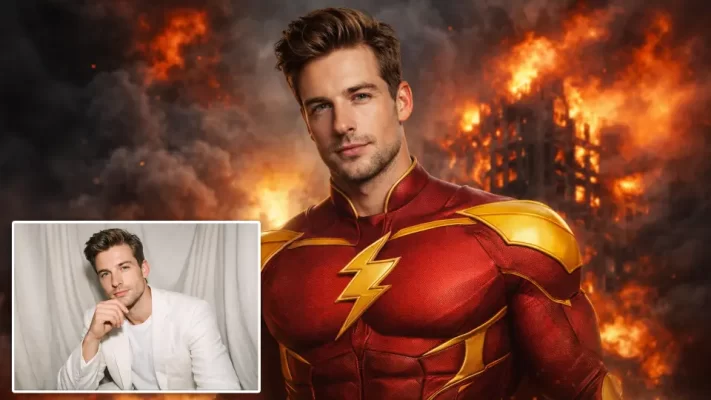
Step In Alone.
Walk Out Legendary.
AI face swap prompts turn solo photos into instant experiences, transforming guests from standing alone into a star.
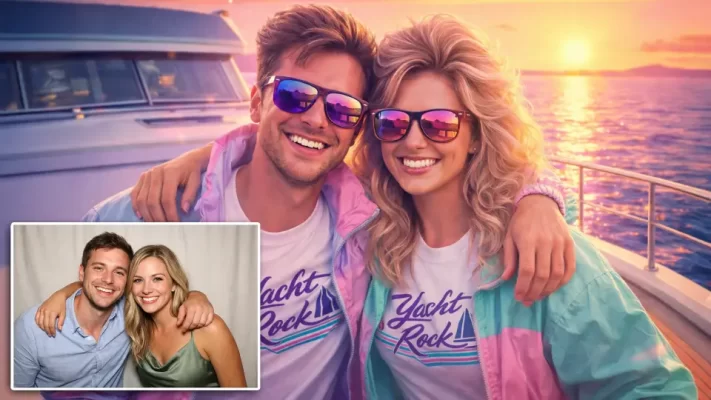
Your Story. Your Partner.
AI Magic.
Couples are instantly transformed into dynamic, story-driven scenes created by AI. Faces are recognized clearly and blended naturally.
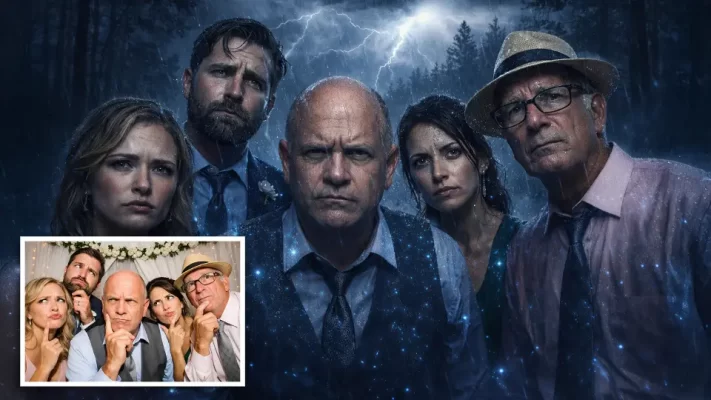
More Faces. More Fun.
Turn group photos into unforgettable experiences. Instead of a simple group shot, every guest becomes part of a cinematic scene.
Scientific precision for AI photo booth prompts.
AI Prompts Aren’t Universal
— And That’s a Good Thing
Same Prompt, Different Magic
The same AI prompt can produce different results depending on the software. Each platform interprets prompts, renders images, and applies filters in its own way. That’s why our AI Prompt Packs include alternative prompts, ensuring you get consistent, high-quality solo, couple, and group photos no matter which software you use.
Ready-to-Use Themed Packs
Multiple Scenes. One Pack. Endless Fun.
Each AI Prompt Pack includes multiple prompts for a variety of scenes, grouped into fun, cohesive themes like ’80s retro, fantasy, superheroes, and holidays. Perfect for solo, couples, or group photos — just copy, paste, and let your AI photo booth create stunning, themed experiences instantly.
The Future of Events
Is Intelligent
Next-Level Entertainment
AI face swaps, cinematic portraits, and immersive virtual scenes transform photo booths from a simple side feature into a full-blown showstopper. We don’t just sell text; we sell the technical certainty.
Guests Expect Innovation
What once felt futuristic is now the standard. AI isn’t a novelty anymore—it’s what guests expect from premium events. In 2026, guests don’t just want to ‘strike a pose’—they want to strike a deal with reality.
Share-Worthy Content
Guests can’t resist sharing AI-enhanced photos and videos the moment they’re created. These eye-catching, scroll-stopping visuals feel fresh, fun, and totally unique—making them perfect for social media.
All the Things You’re Asking
Commonly Asked Questions
Do these prompts work for groups or just single portraits?
Yes! All of our “Pro-Series” prompts include Multi-Subject Logic. Standard prompts often fail when 3+ people are in the shot. We use specific syntax code that tells the software to process every guest as a separate entity, preventing “merged” bodies or extra limbs.
Why does the same prompt look different in Snappic vs. Foto Master?
Every software uses a different “AI Pipeline.” With Fotomaster vs Snappic (for example), Foto Master (FMX) uses a deep-integration cloud model. Snappic (PersonaFX) uses a high-fidelity Portrait Model (Flux 1.1) that focuses on skin texture and “The Look.” Our packs include Optimized Versions for each specific engine to ensure the “creative soul” of the prompt stays consistent across all hardware.
Can I use these prompts with a standard Green Screen?
Yes, but you don’t have to. Most 2026 AI engines (like those in Darkroom or Breeze) have built-in “Segmentation” that automatically “cuts” the person out of the background. Our prompts are written with Auto-Isolation Logic to help the AI cleanly separate your guest from any background—even a busy hotel ballroom.
Why are my guests' faces looking "plastic" or different?
This is usually a Denoising/Strength issue. Too High (0.7+): The AI has too much “freedom” and will start to redesign the person’s face. oo Low (0.3-): The AI won’t change the clothes or background enough. Every style we sell comes with a “Sweet Spot” Setting (usually between 0.45 and 0.52) to keep faces 100% recognizable.
Is there a risk of the AI generating "hallucinations" or weird artifacts?
All Generative AI has a small degree of randomness, but we minimize this through “Seed-Locking” and “Anchor-Refining.” We provide the “Safety String” code in every pack to keep the output professional and clean. AI Face Swap.
Helpful Links
AI Photo Booth Resource Hub
Expertly crafted prompts for the industry’s leading software.Official Software Tutorials
Need help setting up your prompts? Select your software below to view the official setup guides.| Software Platform | Resource Guide |
|---|---|
| Foto Master | AI Setup Guide |
| Darkroom Booth | AI 2025 Webinar |
| Snappic | AI-FX Tutorial |
| Booth.Events | Prompt Webinar |
| Touchpix | AI Face Swap Guide |
| Curator Live | Experience Setup |
