Professional Photoshop Droplets For Photo Booths
Our Droplets help you take better photos.
Taking a great photo with proper lighting and camera knowledge is still very important to learn and master. To maximize the full potential of these droplets, use correct lighting and backdrops. These professional Photoshop Droplets will give you more options with photo styles and filters to help you stand out!
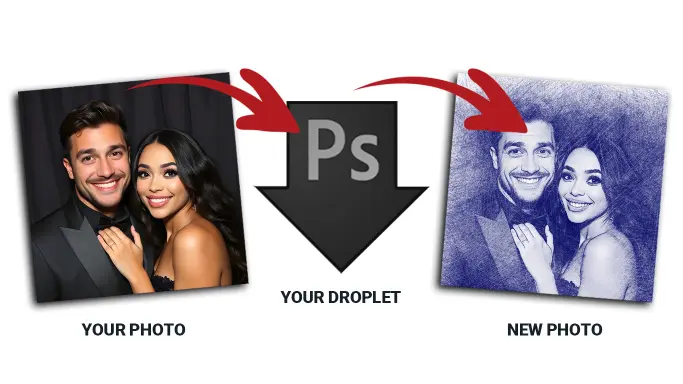
what is a photoshop droplet?
Photoshop droplets are incredibly powerful tools that automate photo editing tasks in Adobe Photoshop. The best part? You don’t need to be a Photoshop expert to use them! A Photoshop droplet is a small program file that works like a shortcut. It’s a pre-configured script created in Adobe Photoshop to apply specific edits or effects to your photos automatically. Instead of manually editing each photo, you can simply “drop” your images onto the droplet, and Photoshop does all the work for you.
photoshop droplet. Why Bigger Is Better.
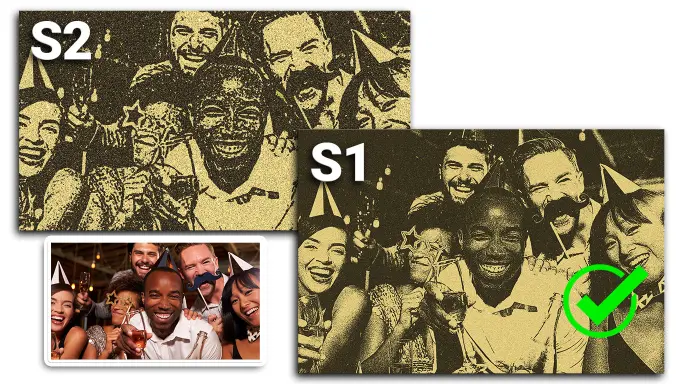
Imagine you’re painting a masterpiece on a canvas. If the canvas is tiny, your brushstrokes have to be small, and there’s little room for detail. But if the canvas is large, you can create intricate details, bold strokes, and beautiful textures that stand out. The same concept applies when using Photoshop droplets: the bigger the photo, the better the results!
Graphics that turn photos into experiences.
Built for all major photo booth software and apps, each design is easy to use, fully customizable, and ready to deliver instant impact. From weddings to corporate events, these graphics help turn every photo into a polished, memorable experience that clients and guests will love.
Allow Windows to run droplet.
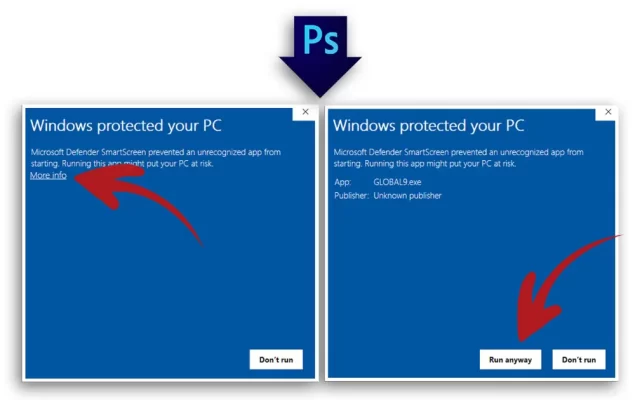
When you download a new droplet and use it for the first time on a Windows computer, follow these steps:
- Open Photoshop and double-click on the droplet icon.
- If a Windows security prompt appears, click “More Info” to reveal additional options.
- Select “Run Anyway” to proceed.
How to use Photoshop FX files.
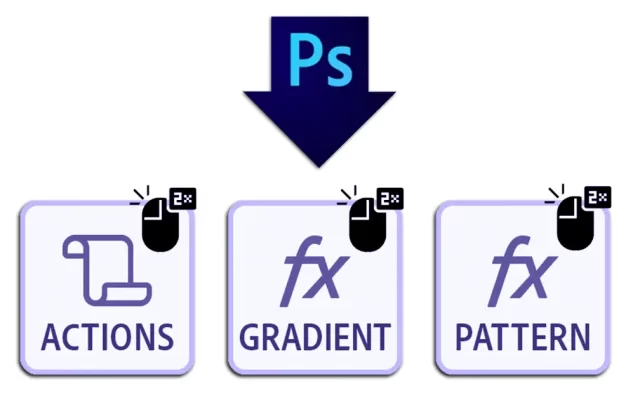
Some droplets may come with additional files, such as Photoshop Action files, Gradient FX files, or Pattern FX files. The Droplet/s associated with these files are required for the droplet to run properly and NEED to be installed first before running the droplet. To install these:
- Ensure Photoshop is running.
- Double-click on the file icons for the FX files.
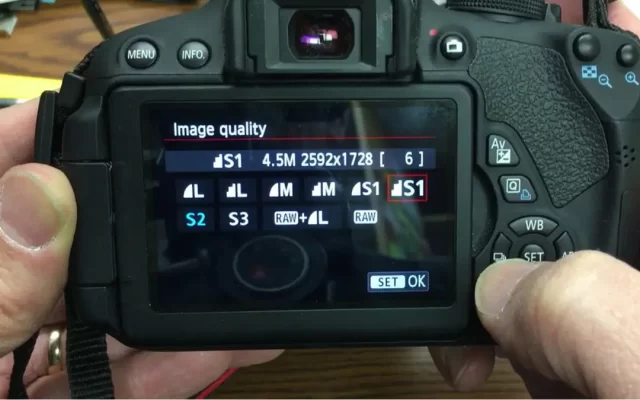
Change your Image Quality Size.
Most photo booth software, such as Fotomaster, typically recommends using the S2 image quality setting because its smaller pixel size ensures faster performance. However, when using a droplet, image size becomes a crucial factor. Switching to the S1 (Small 1) setting can significantly enhance image quality, as it provides a resolution of 2976 x 1984 px compared to 1920 x 1280 px in the S2 setting. Keep in mind that higher quality images require more processing time, which can slow down the workflow. To achieve the best results, aim for the highest quality setting your system can handle without compromising the speed of your workflow.
Fully Supported PC-Based Photo Booth Software.
These programs natively support watch folders or third-party effect routing, allowing them to send captured photos to Photoshop, run the droplet, and pull the edited image back into the layout:
Foto Master (FMX & Mirror Booths):
Highly compatible with droplet workflows for mirror and traditional booth setups.
dslrBooth (LumaBooth for Windows):
Custom Photoshop actions and droplets via its “Post Processing” settings.
Darkroom Booth (Version 3.0+):
Fully compatible with droplet integration for advanced, high-end post-processing filters.
(DSLR Remote Pro 3.7+ & Webcam Booth):
Well-known for supporting droplet outsourcing to apply edits before the print.
Crucial System Requirements to run Photoshop Droplets For Photo Booths
- Platform: Droplets require a Windows PC computer. They will not work on iPads, mobile devices, or Mac OS.
- Background Operation: Adobe Photoshop is strictly required. It must be installed and actively running in the background during the entire event for the droplets to process the images.
- Image Size: While software often defaults to smaller image qualities (like S2) for speed, running droplets yields much better visual results on higher resolutions (like S1). Customers should be advised to aim for the highest quality setting their PC can process without slowing down the booth's workflow.
- Platform: Droplets require a Windows PC computer. They will not work on iPads, mobile devices, or Mac OS.
- Background Operation: Adobe Photoshop is strictly required. It must be installed and actively running in the background during the entire event for the droplets to process the images.
- Image Size: While software often defaults to smaller image qualities (like S2) for speed, running droplets yields much better visual results on higher resolutions (like S1). Customers should be advised to aim for the highest quality setting their PC can process without slowing down the booth's workflow.
Photoshop Droplets Helpful Links:
dslrBooth (LumaBooth for Windows)
Photo Booth Droplets
Common Questions
Why does my photo booth software time out before the edited photo appears?
This usually happens if Photoshop isn’t already open in the background, or if your image file sizes are too large for your PC’s processor to handle quickly. Ensure Photoshop is running before you start the booth and try reducing your camera’s image resolution. You may need to increase the time in workflow to allow photo shop to finish.
I keep getting a "Droplet couldn't communicate with Photoshop" error. How do I fix it?
This is a Windows permissions issue. You need to ensure both the droplet and Photoshop are running at the same permission level. Right-click the droplet file, select Properties > Compatibility, and check “Run this program as an administrator.” If that doesn’t work, temporarily lowering your Windows User Account Control (UAC) slider can resolve the block. Also, do not run your photo booth software in adimin mode.
Will these droplets work on my iPad photo booth (like Touchpix or Snappic)?
No. Photoshop droplets are executable files (usually .exe) that require a full desktop operating system (Windows) and the full desktop version of Adobe Photoshop installed and running to function.
Can I apply these droplets to Boomerangs, GIFs, or Videos?
No. Photoshop droplets are designed to run batch processes on still images (JPEGs or PNGs). They cannot process video files or multi-frame GIFs on the fly in a photo booth environment.
Does running a droplet permanently alter the original photo?
The droplet will alter the specific file it is fed. However, most professional photo booth software allows you to save the “Raw/Original” photo to a separate folder before handing a copy off to the droplet for post-processing. Check your specific software’s save settings.
Why did my droplets stop working after I updated Photoshop?
When Adobe pushes a major version update (e.g., updating from CC 2024 to CC 2025), the background connection paths can sometimes break. You need to ensure both the droplet and Photoshop are running at the same permission level. Right-click the droplet file, select Properties > Compatibility, and check “Run this program as an administrator.” If that doesn’t work, temporarily lowering your Windows User Account Control (UAC) slider can resolve the block. Also, do not run your photo booth software in adimin mode.
How many people can be in the photo for the droplet to work properly?
Standard color-grading, lighting, and texture droplets will apply to the entire image regardless of how many people are in the frame. Note: If you are using advanced AI-based replacement actions within your droplet, refer to the specific asset instructions, as complex face-swapping or subject-detection actions are generally optimized for 1-4 people to prevent visual errors.
All droplets deigned using Photoshop 2022, older version of Photoshop may work as well but are not guaranteed. PC Computer, will not work on ipads or Macs. Works with DSLR photo booths including Fotomaster, Breeze DSLR, DSLR Booth, Darkroom, Breeze Webcam Booth. Other software may also work, please check your software manual.
