What File Type Is Best for Photo Booth Overlays?
Helping photo booth owners look professional—fast. This guide breaks everything down in simple terms so you can confidently choose the best file type for your photo booth overlays without stress or guesswork.
Why File Types Matter for Photo Booth Overlays.
If you own a photo booth business, choosing the right overlay file type can feel confusing—especially if graphic design and computers aren’t your strong suit. With so many options like PNG, JPG, and PSD, it’s easy to wonder what actually works best in real photo booth software.The file type you use directly affects how your photo booth overlays look, load, and perform during an event. Using the wrong file type can lead to blurry images, missing transparency, slow processing, or overlays that don’t fit the photo correctly.
what is a photo booth overlay?
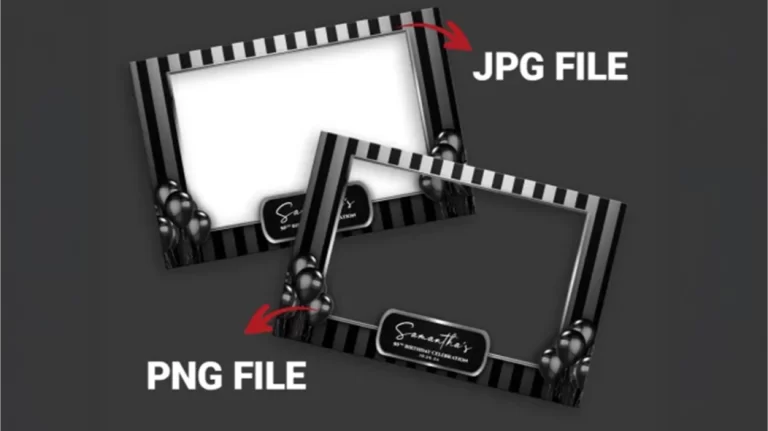
A photo booth overlay is a transparent digital graphic that sits on top of your photos, videos, or GIFs. Think of it as a custom-designed frame that adds personality and context to every capture. Typically created as a transparent PNG file, it includes essential details like wedding names, event dates, or corporate logos. Without an overlay, a photo is just a random snapshot; with one, it becomes a branded keepsake. PNG overlay for photo booths.

PNG vs JPEG. What’s the difference?
PNG and JPEG are both image file types, but they work very differently—especially for photo booth overlays. PNG files support transparent backgrounds, which means the overlay can sit cleanly on top of a photo without covering it. This is essential for frames, text, logos, and decorative elements used in photo booths. JPEG files do not support transparency, so they always include a solid background (usually white), which can block parts of the photo and ruin the design. JPEGs also use compression to make file sizes smaller, which can reduce image quality and make text or fine details look blurry. For this reason, PNG is the best choice for photo booth overlays, while JPEG is better suited for full photos—not graphics layered on top of them. PNG overlay for photo booths, What File Type Is Best for Photo Booth Overlays.
What is a PSD File?
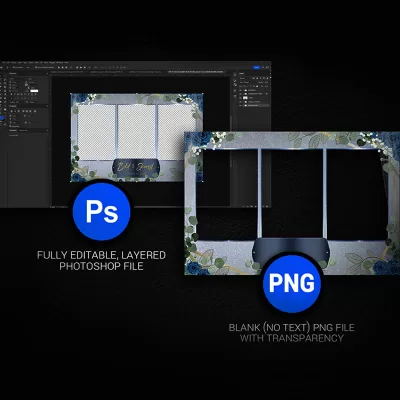
A PSD file is a Photoshop Document, which is the main file format used by Adobe Photoshop. Think of a PSD as an editable master file. It can contain multiple layers, text, images, and effects, all kept separate so they can be easily changed later. This makes PSD files perfect for creating custom photo booth overlays, such as updating names, dates, colors, or event details. PSD files are not used directly in photo booth software, so once editing is finished, the file should always be exported as a PNG for actual photo booth use. What File Type Is Best for Photo Booth Overlays, PNG overlay for photo booths
Why Transparency Is So Important.
Transparency means the background of your overlay is invisible. Without transparency, your overlay would cover the entire photo instead of sitting nicely on top of it. PNG files handle transparency cleanly and reliably, which is why most photo booth software recommends them. This is one of the most essential photo booth graphic design tips for beginners.
Best Image Size and Resolution for Photo Booth Overlays.
Using the correct size is just as important as using the correct file type. Overlays should match the photo resolution used by your booth—such as 4×6, square, or portrait. High-resolution PNG files ensure your custom photo booth overlays don’t look stretched, pixelated, or blurry when printed or shared digitally. Knowing the different overlay sizes with the photo booth app / software you are using IS A MUST! What File Type Is Best for Photo Booth Overlays.
Top 7 Graphic Design Lingo You Need To Know!
What File Type Is Best for Photo Booth Overlays? Mastering these seven essential design terms will bridge the gap between your creative vision and the technical requirements of platforms like Snappic or Foto Master, giving you the confidence to communicate like a pro and deliver stunning, high-end results for your clients.
#7 – Resolution:
Using the correct size is just as important as using the correct file type. Think of resolution as the “detail density” of your image. It’s measured in pixels, and the more you have, the sharper your graphics will look. For photo booth owners, this is the line between a professional, crisp print and a blurry, “blocky” mess.
#6 – DPI (Dots Per Inch):
While resolution tells you how many pixels are in your digital file, DPI determines how those pixels actually translate to the physical world. In the photo booth industry, 300 DPI is the industry gold standard for printing; it tells the printer to pack 300 tiny dots of ink into every inch of paper. If your DPI is too low, your printer won’t have enough “information” to work with, resulting in grainy or fuzzy prints—even if the design looked okay on your computer screen.
#5 – CMYK vs RGB:
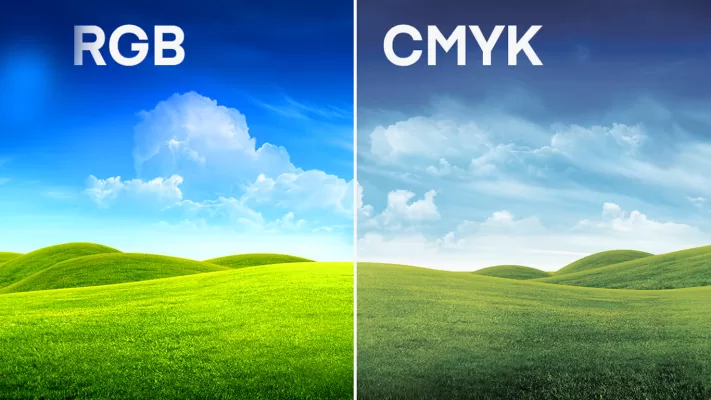
This is the difference between “Screen” and “Ink.” RGB (Red, Green, Blue) is used for anything displayed on a screen—like your iPad’s “Tap to Start” screen or digital shares. CMYK (Cyan, Magenta, Yellow, Key/Black) is the language of professional printers. If you design an overlay in RGB but print it on a dye-sublimation printer, your colors might look “off” or less vibrant than they did on your monitor.
#4 – Serif and Sans Serif:
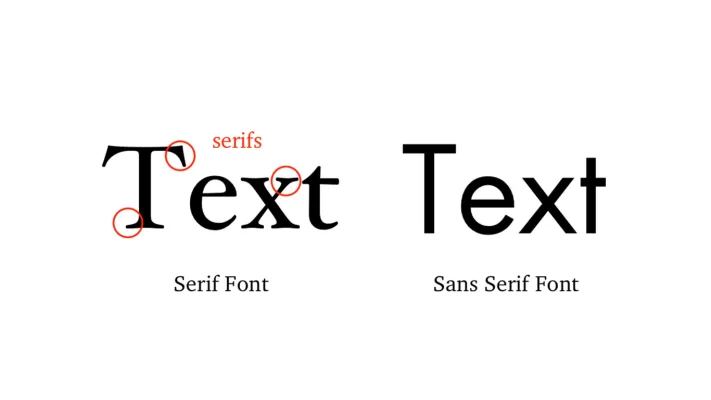
These are the two main “families” of fonts, and choosing the right one sets the entire mood of your event. Serif fonts have small decorative “feet” at the ends of the letters (like Times New Roman), giving off a classic, elegant, and traditional vibe—perfect for formal weddings. Sans Serif fonts (like Arial or Helvetica) lack those feet, offering a clean, modern, and “minimalist” look that’s highly readable on iPad screens and digital galleries.
#3 – PNG vs JPG:
Understanding the differences between PNG and JPG file formats is crucial for a photo booth business for several reasons: PNG: supports lossless compression, which means no data is lost during compression. This format is ideal for images that require high quality and detail, making it suitable for photos with intricate details or transparency. You need transparency for your overlay templates. JPG: Generally has smaller file sizes, making it more suitable for situations where storage and bandwidth considerations are crucial, such as when uploading images online or sharing them through various platforms. JPG Does not support transparency. What File Type Is Best for Photo Booth Overlays.
#2 – Overlay Template:
Using the term “overlay template” instead of words like “frame” or “border” in the context of a photo booth business is important for several reasons: The term “overlay template” accurately describes the digital graphic or design that is overlaid onto the photos taken in the booth. Calling it a “frame” or “border” might imply a physical, tangible object around the photo, which could lead to confusion. Using industry-specific terminology demonstrates professionalism and a clear understanding of the photo booth business.
#1 – White Balance:
White balance is a photography term that tells your camera or booth software how to interpret “true white” under different lighting conditions. If it’s set incorrectly, a white wedding dress might look yellow under warm indoor bulbs or blueish in the shade. Mastering this ensures that skin tones look natural and your digital assets—like your overlays and backgrounds—blend perfectly with the live photo for a professional, high-end finish.
